Notes are used to document client observations not captured in the Care Plan. These notes are saved to the client file and can be seen by the office team and other CHWs visiting this client. Creating a note is an optional activity that should be completed before finalizing or completing the client visit.
To create a note from the Appointment Details screen, follow these steps:
1. Tap the Ellipses menu then select Create Note.
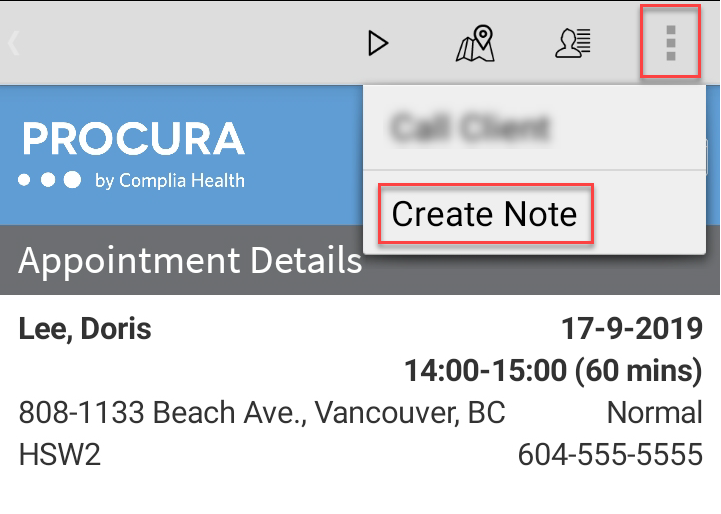
The Create Note Screen appears. Type, Date and Department are populated for you.
2. Enter Subject and Contents Information.
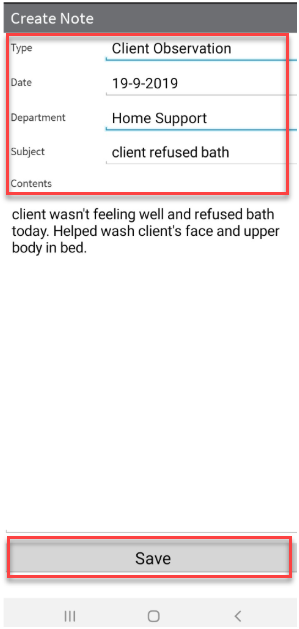
3. Tap Save when your note is completed. This note is now visible to other CHWs when they access View Notes from Client Details.
 Once you save your note, you cannot make changes from Procura mobile. If you need changes to be made to your note, call your office and ask them to make the changes. Once you save your note, you cannot make changes from Procura mobile. If you need changes to be made to your note, call your office and ask them to make the changes. |