Canned reports are ready to use, pre-defined reports already in Procura. Many of these reports have templates which have defined filters so you don't have to select the criteria every time. Learn how to run a report with a template, click here.
Most of the canned reports are found on the Main Ribbon > Reports. **For Management specific reports click here.**
Note: Depending on your role and access, you may not see some reports shown in the tables below.

Click on a category below to quickly jump to those reports.
Client Reports
|
Name |
Description |
|
Client Profile Report |
Use the Client Profile Report to review information for a client or group of clients. |
|
Client Listing Report |
The Client Listing Report gathers together a comprehensive list of clients based on selected criteria. |
|
Client Additional Info Report |
Use the Client Additional Information Report to view additional information that pertains to your clients (including some client statistical information), and to track specific attributes. |
|
Client Cancellation Report |
This report displays information pertaining to visit cancellations. It can present this information from the perspective of either the client or the employee. |
|
Client Data Sheet Report |
This report functions as an information sheet, which can be forwarded to a client to let them know how many hours of service have been approved by their funder, the commencement date of that service, what is to take place during the visit, who their main home support worker is, etc. |
|
Client Dated Notes Report |
Use the Client Dated Notes Report to print any dated notes that have been stored for your clients. |
|
Client Mailing Labels |
This report enables you to print client mailing labels based on selected criteria. |
|
Client Order Billing Info Report |
The report can be used to determine if all new client orders are set up properly. It helps to determine if correct information exists in the database and that all information required for orders has been entered correctly. |
|
Client Order Status Report |
The report enables you to print order billing information so that billing clerks can quickly review the setup of the order. The report provides a pre-check to ensure that the clients with orders have a target order. |
|
Client Service Summary Report |
The Client Service Summary Report provides a listing of clients and the services that they have received. |
|
Order Maximum Exception Report |
This report enables you to identify those clients who are either coming close to exceeding their order rules, or who have already exceeded it. It can also be used to identify those orders that have no rules attached. |
Employee Reports
|
Name |
Description |
|
Employee Listing Report |
This report gathers together a comprehensive list of employees based on selected criteria. |
|
Employee Additional Info Report |
Use this report to view additional information that pertains to your employees (including some employee statistical information), and to track specific attributes. |
|
Employee Dated Notes Report |
Use this report to print any dated notes that have been stored for your employees. |
|
Employee Mailing Labels |
This report enables you to print employee mailing labels based on selected criteria. |
| Employee Travel Report |
The Best Route mileage calculation generates payable mileage expenses in Timekeeping, according to pre-defined travel rules, so that staff can be reimbursed for distance driven during their working day. The Employee Travel Report uses this calculate to list the mileage and the travel time (listed in minutes) for each employee, within a selected period of time. |
Scheduling Reports
|
Name |
Description |
| Client Schedule Report | This very flexible reports enables you to print schedules for a particular department, client, client or employee area, schedule group, and for a specific time period. Additionally, you can filter results to report on overlapping visits, and attendance type or essential service visits. |
| Client Calendar Schedule Report | This report provides details of all of the upcoming visits to a specific client. This helps your staff illustrate to that client the service plan they can expect to receive in the near future. |
| Availability Listing Report | This report provides displays details about the availability of your employees. |
| Contact Tracing Report | This report will generate output tracking for clients and employees that have potentially been exposed to COVID-19 based on a single original starting client or a single original starting employee. |
| Employee Calendar Schedule Report | This report provides details of all of the upcoming visits to be made by a specific employee. This helps your staff illustrate to that employee the service plan they can expect to provide in the near future. |
| Employee Schedule Report | This report displays details of your employee's schedules. |
| Employee Workload Measurement Report | This report provides a proactive review of work assignments for staff so they can ensure that collective agreement issues are accommodated. It fully supports an audit of assigned work to their Employee Category and Seniority level. By comparing the workload with similar employees, a determination can be made regarding the level of support. |
| Linked Visits Report | This report is used by schedulers and supervisors to list the employees linked to client visits and attendance types. It is used to identify visits where more than one employee is linked to the client visit. |
| Report of Service (Portrait) | This report allows staff to plan their days using detailed information about each client visit to which they have been assigned. A brief comparison of schedules against this report is recommended for accuracy. |
| Report of Service (Landscape) | This report enables staff to determine which clients to visit and the tasks to be completed. After the staff has made their notations, it enables the timekeeper to make timesheet adjustments. |
| Weekly Caseload Report | This report enables staff to assess their planned caseloads for a defined period. |
| Weekly Planning Report |
This is a report that provides staff with a schedule with which to review and plan visits. |
Timekeeping Reports
|
Name |
Description |
| Attendance Type Report | This report enables staff to access information relating to employee-specific or generic attendance. It enables them to monitor leave requests by type, (e.g., sick time, LOA, union business, refusals, etc.). It provides them with summary, detail, cost and trend analysis of leave requests by attendance type, employee or reason, for an employee population or for any date range. |
| GPS Exception Report | The report provides detailed information on GPS exceptions so that you do not need to access the on-screen displays in the Locate Employee form. The detail mode of the report uses the same calculation that produces the exception amount on the Locate Employee - Visit Detail screen. It is used to determine if follow-up with specific employees is required. It will report on GPS exceptions for in-scope visits. You can select one or more employees, or departments, on which to report, as well as a range of dates. |
| Mobile Exceptions Report |
The Mobile Exceptions Summary Report lists exceptions created by processing for mobile visits, and provides statistics on the timeliness of visit delivery. Use this report to compare statistics between departments and user areas, and in some cases, individual employees. The following Exceptions will be included on the report:
|
| Pay Rate Summary Report | This report allows for a comparison of the number of hours paid and billed by the pay/bill rates for a timekeeping period or date range. Keep in mind that the report collects information from verified visits only. The gathered visit information is then grouped by pay rate. |
| Time on Duty Report | This report enables operational staff to review staff workload to ensure that work allocation for their area of responsibility falls within the targets that are defined within the collective agreement. It also enables staff to review service allocation by employee and employee category to ensure that all work areas are within the targets that are defined within the collective agreement, as well as review for planning workload distribution and assignments. |
| Timekeeping Change Log Report | This report enables staff to report the changes made in timekeeping. It documents the amount of changes that are having to be made at the timekeeping level, which indicates the level of accuracy of the schedules. It displays changes for verification, billed, paid, bill service type, pay service type, duration, pay duration, bill duration, order, added records, and start and stop times. |
| Timekeeping Detail by Employee Report | This report enables you to track time, billing and pay information by employee. |
| Timekeeping Detail/Summary Report | This report provides a summary of all the employees, clients, funders or department timekeeping records for the current and past timekeeping periods. |
| Timekeeping Expense and Mileage Report | This report lists expense and mileage records that have been entered into timekeeping. |
Billing Reports
|
Name |
Description |
| Billing Details Report | This report allows you to review the billing summaries for each client to determine if there are any errors. The report also displays detailed client billing records for a specific batch or for a specific date range within a batch. |
| Billing Period Summary Report | This report enables billing staff to review scheduled vs. billed data to determine if any billings have been missed in the billing process. It allows staff to review information that relates scheduled to billed visits when reviewing policies such as the billing of canceled visits. It also allows them to monitor revenue streams by funder and by the type of service provided. |
| Billing Summary by Coordinator Report | This report enables you to track the number of visits and billing totals for the coordinator of a specific funder. It enables staff to produce accurate statistics regarding client service levels based on the coordinator and funder that authorized the service order. |
| Client Billing History Report | The report provides a history of client billing. Client estates often request that organizations produce this history. |
Statistical Reports
|
Name |
Description |
| Caseload by Area Report | This report allows staff to display client status transactions, (i.e., Admission, Active and Discharged), based on the area in which their clients reside. It displays the breakdown for admission and discharge rates by area, and whether they have increased or decreased over time. |
| Client Reference Number Statistical Report | This report enables staff to retrieve client counts by reference number type. The report is often used to record and report on client care levels, risk factors or other common-value types of reference data. |
| Continuity of Care Report |
This report enables staff to retrieve continuity of care information where you see what same employees are delivering home support to clients. The Continuity of Care Report should be run monthly for a past month in order to report on the services that were delivered to clients in the date range for each department. The report can also be run for future dates in order to predict what the compliance rate will be, so that scheduling changes can be made to correct any outliers. |
| Employee Reference Number Statistical Report | This report enables staff to retrieve employee counts by reference number type. The report is often used to record and report on employee care levels, risk factors or other common-value types of reference data. |
| Profitability Report | This report supports staff who need to view client and employee charges, and the profitability of employee categories and pay service types. It uses visit information that has gone through the timekeeping process to group client and employee charges first by billing type or code, and then by employee category and pay service type. If expense and mileage are included in the report, the calculation of gross margin includes the amounts of expense and mileage. Keep in mind that only visits that are both payable and billable are included in this report. |
Management Reports
These are reports commonly used by managers and operations that have been grouped together. They are found on the Main Ribbon > Management. Some of these reports are also found under the Reports tab in different sections.
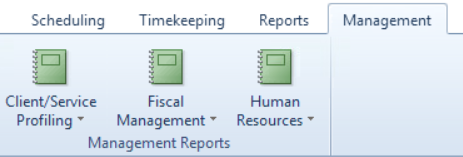
Click on a section below to quickly jump to those reports.
Client/Service Profiling Reports
|
Name |
Description |
| ADT by Age Group Report | This report displays accurate statistics regarding current client service levels, (e.g., admission, discharge, etc.), based on the age of the clients. |
| ADT by Diagnosis Report | This report displays accurate statistics regarding current client service levels, (e.g., admission, discharge, etc.), based on the diagnosis of the clients. |
| ADT by Funder Report | This report displays accurate statistics regarding current client service levels, (e.g., admission, discharge, etc.), based on the client's primary funder source. |
| ADT by Gender Report | This report displays accurate statistics regarding current client service levels, (e.g., admission, discharge, etc.), based on the gender of the clients. |
| ADT by Language Report | This report displays client status transaction statistics, (e.g., admission, discharge, etc.), based on the languages they speak. |
| ADT by Referral Source Report | This report displays client status transaction statistics, (e.g., admission, discharge, etc.), based on the organization that referred the client for service. |
| ADT by Status Reason Report | This report displays client status transaction statistics, (e.g., admission, discharge, etc.), based on the reason for the clients' statuses. |
| Billing Summary by Coordinator Report | This report enables you to track the number of visits and billing totals for the coordinator of a specific funder. It enables staff to produce accurate statistics regarding client service levels based on the coordinator and funder that authorized the service order. |
| Client Reference Number Statistical Report | This report enables staff to retrieve client counts by reference number type. The report is often used to record and report on client care levels, risk factors or other common-value types of reference data. |
| Client Status Changes Report | Use the Client Status Changes Report to view the differences between statuses based on the number of days between status changes. For example, it will allow staff to determine how long it takes for the average client to be admitted, and then discharged, or even terminated. The report helps you determine how long clients receive service from your organization, on average. It also enables you to determine which status the majority of your clients reside at. |
| Program Survey Report | You can use this form to enter the cost of each service. |
| Visit Counts by Billing Code and Start Time or Shift Code Report | This report allows staff to analyze visit patterns and trends using both the billing code and the time of day. |
| Visit Counts by Funder and Billing Code Report | This report allows staff to analyze or monitor visit counts and trends using both the funder and the billing code. |
| Visit Counts by Start Time or Shift Code Report | This report allows staff to analyze visit patterns and trends by time of day. |
| Workload Analysis by Area Report | This report enables staff to determine workloads by area code, detailed by care plan activity. Keep in mind that it will only produce results if billable care plan activities are attached to the visit, or to the order. |
Fiscal Management Reports
|
Name |
Description |
| Billing Period Summary Report | This report enables staff to review scheduled vs. billed data to determine if any billings have been missed in the billing process. It allows staff to review information that relates scheduled to billed visits when reviewing policies such as the billing of canceled visits. It also allows them to monitor revenue streams by funder and by the type of service provided. |
| Client Cancellations Report | This report displays information pertaining to visit cancellations. It can present this information from the perspective of either the client or the employee. |
| Timekeeping Expense and Mileage Report | This report lists expense and mileage records that have been entered into timekeeping. |
| Order Maximum Exception Report | This report enables you to identify those clients who are either coming close to exceeding their order rules, or who have already exceeded it. It can also be used to identify those orders that have no rules attached. |
| Profitability Report | This report supports staff who need to view client and employee charges, and the profitability of employee categories and pay service types. It uses visit information that has gone through the timekeeping process to group client and employee charges first by billing type or code, and then by employee category and pay service type. If expense and mileage are included in the report, the calculation of gross margin includes the amounts of expense and mileage. Keep in mind that only visits that are both payable and billable are included in this report. |
| Pay Rate Summary Report | This report allows for a comparison of the number of hours paid and billed by the pay/bill rates for a timekeeping period or date range. Keep in mind that the report collects information from verified visits only. The gathered visit information is then grouped by pay rate. |
| Revenue Analysis Report |
This report enables staff to perform a revenue analysis on their organization based on data present in the Scheduling, Timekeeping or Billing modules. It allows them to review past, present and future projections of income and cost based on a variety of groupings, including clients and employees. It also allows reporting by a specific funder, in order to determine income and cost associated with these clients. |
Human Resources Reports
|
Name |
Description |
| Attendance Type Report | This report enables staff to access information relating to employee-specific or generic attendance. It enables them to monitor leave requests by type, (e.g., sick time, LOA, union business, refusals, etc.). It provides them with summary, detail, cost and trend analysis of leave requests by attendance type, employee or reason, for an employee population or for any date range. |
| Employee Reference Number Statistical Report | This report enables staff to retrieve employee counts by reference number type. The report is often used to record and report on employee care levels, risk factors or other common-value types of reference data. |
| Employee Workload Measurement Report | This report provides a proactive review of work assignments for staff so they can ensure that collective agreement issues are accommodated. It fully supports an audit of assigned work to their Employee Category and Seniority level. By comparing the workload with similar employees, a determination can be made regarding the level of support. |
| HR Statistics by Language Report |
This report displays employee status transaction statistics, (e.g., probation, active, terminated, etc.), based on the languages they speak. This helps managers project future staffing needs. It allows them to identify trends in recruitment and termination for employees or volunteers. It identifies all employees who are working for an organization, by the languages spoken by the staff member. It enables managers to produce accurate statistics regarding current Human Resources' language skills, based on employee status. It allows Human Resources' managers to ensure that staffing levels are adequate to support the needs of the clients where a given language requirement frequency increases. When used in combination with the ADT Statistics by Language report, this report can provide decision support for managers during the applicant recruitment and selection process. |
| HR Statistics by Status Reason Report | This report displays employee status transaction statistics, (e.g., probation, active, terminated, etc.), based on the reason for a change in their status. It allows managers to review termination statistics that might affect future hiring and/or staff management practices. It allows them to identify the most common reasons for extended employee absences. |
| Labor Rules Exception Report | This report identifies those employees who are not meeting minimum levels of service or are exceeding maximum levels of service, as defined by the organization and/or labor agreement. |
| Time on Duty Report |
This report enables operational staff to review staff workload to ensure that work allocation for their area of responsibility falls within the targets that are defined within the collective agreement. It also enables staff to review service allocation by employee and employee category to ensure that all work areas are within the targets that are defined within the collective agreement, as well as review for planning workload distribution and assignments. |
| Visit Counts by Billing Code and Start Time or Shift Code Report | This report allows staff to analyze visit patterns and trends using both the billing code and the time of day. |
| Visit Counts by Employee Category Report | This report allows staff to analyze visit patterns by the type of employee who filled the visit. |
| Visit Counts by Start Time or Shift Code Report | This report allows staff to analyze visit patterns and trends by time of day. |